Getting started
Docs › Start here
This tutorial takes about two minutes: you install Raven, give it two small R files, and watch it catch a bug that spans both files.
You don't need R installed for any of it. Raven reads your code; it never runs it.
1. Install the extension
In VS Code, open the Extensions view, search for Raven, and install Raven by jbearak. You can also install it from the Marketplace page. In Cursor, Positron, or VSCodium, install it from Open VSX.
The extension includes the language server, so there is nothing else to install. Using Neovim, Zed, Helix, or Emacs instead? Follow Editor setup, then come back to step 2.
To try new features before a stable release, open Raven in the Extensions view and click Switch to Pre-Release Version. Starting with 0.23, pre-releases have an odd minor version (0.23, 0.25) and stable releases an even one. On a remote host, such as over SSH, switch the copy installed on that host.
2. Make two files
Create an empty folder, open it in VS Code (File › Open Folder), and add two files.
helpers.R:
summarize_scores <- function(scores) {
  c(mean = mean(scores), best = max(scores))
}
main.R:
source("helpers.R")

scores <- c(72, 88, 95)
result <- summarize_score(scores)
print(result)
3. See the warning
In main.R, summarize_score gets a yellow squiggle. Hover it to read the message, or open the Problems panel (View › Problems):
summarize_score is not defined
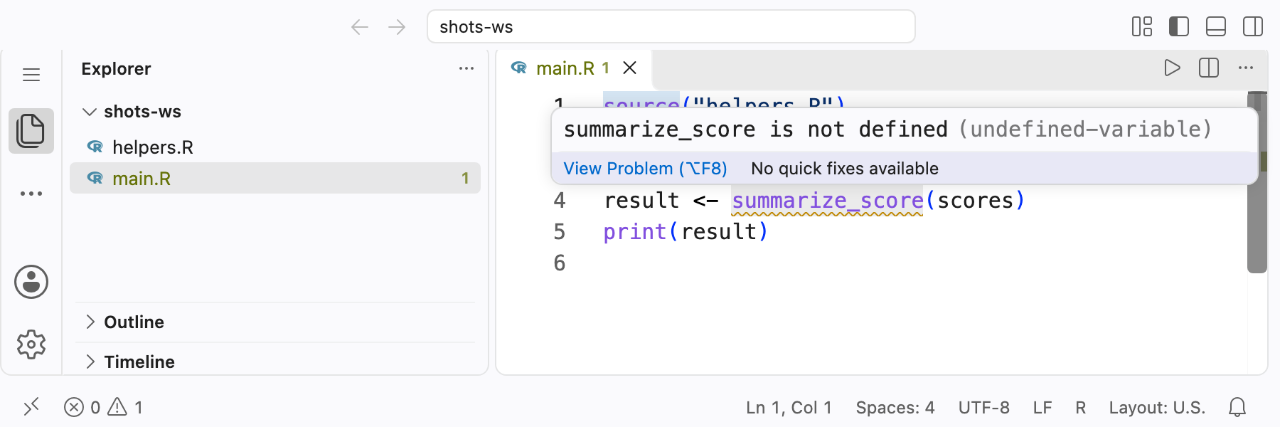
Step 3 in VS Code (Raven 0.21.1).
Raven followed source("helpers.R"), found summarize_scores (plural) there, and saw that summarize_score exists nowhere. R would only tell you this when you ran line 4.
4. Fix it
Add the missing s:
source("helpers.R")

scores <- c(72, 88, 95)
result <- summarize_scores(scores)
print(result)
The squiggle disappears as you type. The name now matches a function that helpers.R defines before line 4 runs, which is exactly what Raven checks.
5. Jump across files
Hold Cmd (macOS) or Ctrl (Windows, Linux) and click summarize_scores. Or put the cursor on it and press F12. VS Code opens helpers.R at the definition.
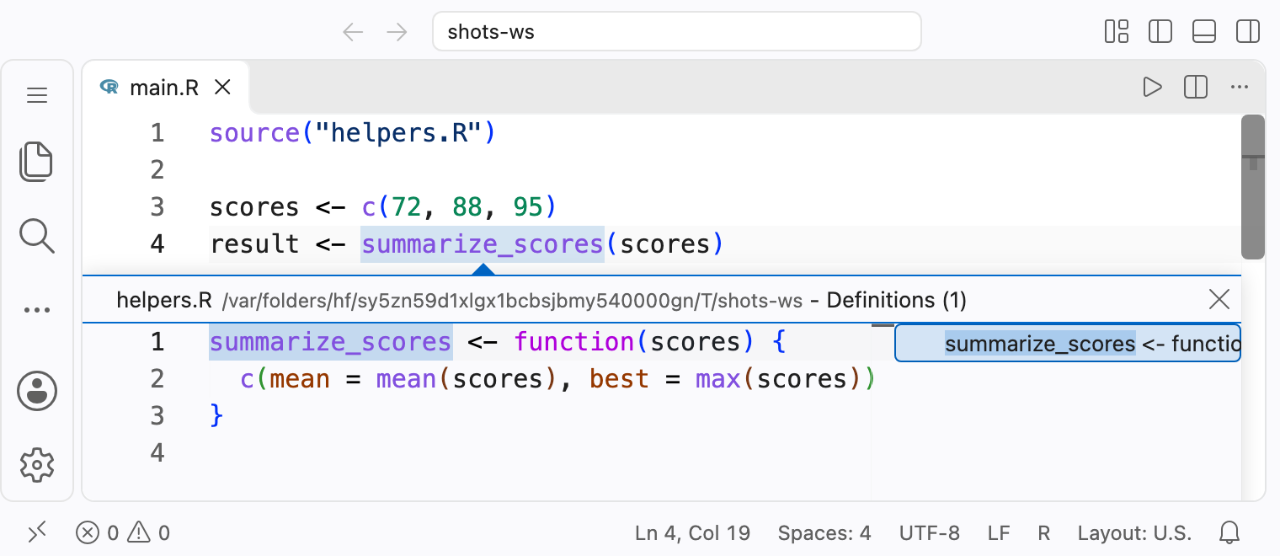
Peek Definition (Alt+F12, or Option+F12 on macOS) shows the definition without leaving main.R (Raven 0.21.1).
Hover summarize_scores in main.R, and Raven shows the definition and the file it comes from. Completion works the same way: type summ in main.R, and summarize_scores is offered because it is in scope there.
6. Optional: run the same check from a terminal
The extension's copy of Raven isn't on your PATH. To use the command line, install the raven CLI and check it with raven --version.
In your folder, with the fix from step 4 in place:
$ raven check .
0 issues (0 errors, 0 warnings, 0 infos, 0 hints, 0 notes)
Before the fix, the same command reports the warning and exits with status 1. That non-zero exit is what fails a CI build:
$ raven check .
main.R:4:11 warning: summarize_score is not defined [undefined-variable]
1 issues (0 errors, 1 warnings, 0 infos, 0 hints, 0 notes)
Next steps
- Run
raven checkon every pull request: Raven in CI. - Learn what else Raven reports, and how to silence a false positive: Diagnostics.
- Raven doesn't flag dplyr column names and other non-standard evaluation; when it can't tell, this page explains what to do.
- Use Raven's R console, debugger, and viewers in VS Code: R console.
- Moving from RStudio, vscode-R, Positron, or lintr: Coming from another tool.
- More examples to open in VS Code, from cross-file navigation to package mode, are in the demo workspaces.