Go to definition
Docs › Navigation and editing
Cmd-click a name (Ctrl-click on Windows and Linux, or press F12) to jump to where it is defined, whether that is earlier in the file, in a sourced file, or in a parent script.
# main.R
source("utils.R")
result <- helper_function(42)  # Cmd-click helper_function: opens utils.R at its definition
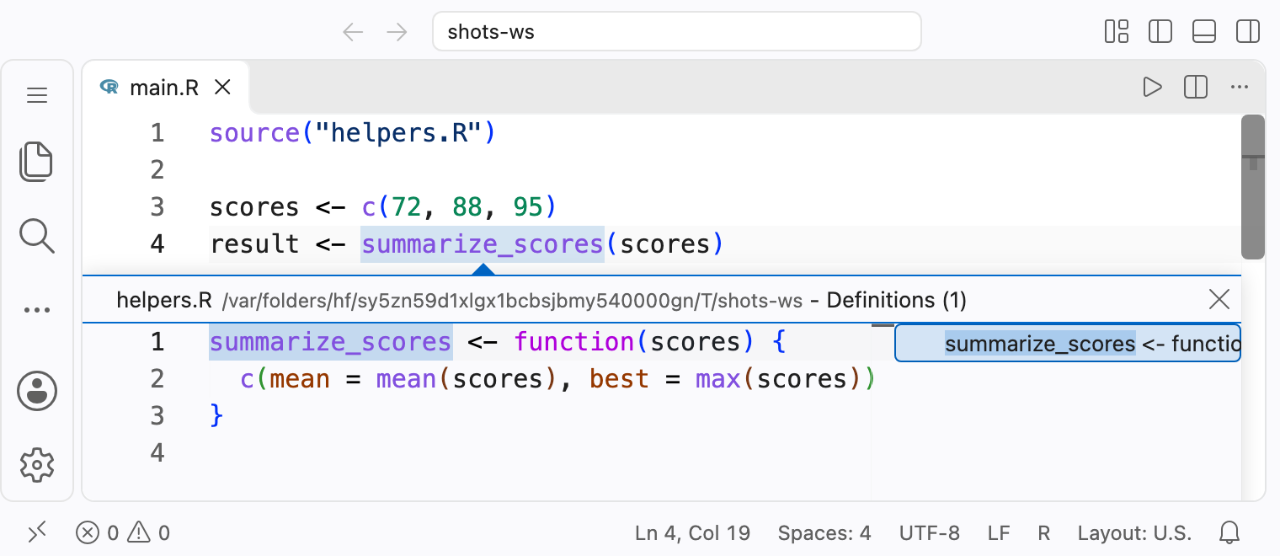
Peek Definition (Alt+F12) on a function defined in a sourced file (Raven 0.21.1).
# utils.R
helper_function <- function(x) { x * 2 }  # jump target
What you can jump to
| At the cursor | Jumps to |
|---|---|
| A variable or function name | The most recent assignment in scope, in the same file or a sourced file |
The name after $ or @ (foo$bar) |
The member assignment or the named field in a constructor call; see $ and @ member resolution |
A literal string in [[ (foo[["bar"]]) |
The same place as foo$`bar`, because [[ extracts the same element as $ |
A symbol declared with # raven: var or # raven: func |
The directive line; see Declared symbols |
A file path in source() or a path directive |
The file, opened at the top |
A static relative or configured module path in box::use() |
The module file, or its __init__.r / __init__.R |
| An exported member of a box namespace alias, or an attached or renamed box binding | The original definition in the local module, including through named, renamed, and wildcard re-exports. Members of installed packages don't navigate. |
A literal .R/.r script or a selected or renamed local member in a static import:: call |
The script file, or the member's original top-level definition |
A name in a .stan, .jags, .bugs, or .bug file |
The most recent definition at or before the cursor, or the first one if the cursor comes before all of them; see JAGS and Stan |
Position-aware resolution
Raven jumps only to definitions that exist at the cursor when the code runs. Cmd-clicking a variable above its assignment doesn't jump to the later assignment:
x  # no jump: x isn't defined yet
x <- 1
x  # jumps to the line above
Inside function bodies, global definitions are hoisted, because R looks globals up when the function runs. A function body can jump to a helper defined below it at file scope. Variables local to the function stay strictly positional. See Global symbol hoisting.
Cross-file navigation
When a name is defined in a sourced file, Cmd-click opens that file with the cursor on the definition, as in the example at the top of this page.
Raven follows both source() calls and forward directives (# raven: source, # raven: run, # raven: include). Backward directives (# raven: sourced-by, # raven: run-by, # raven: included-by) bring the parent file's symbols into scope, so Cmd-clicking a parent's symbol in a child file works too.
If Raven finds no definition through source() links, it falls back to other open files and the workspace index, so you can still reach a likely candidate while exploring a project.
$ and @ member resolution
When you Cmd-click the name after $ or @ (for example host in config$host), Raven looks for it as a member of config, not as a free variable. It searches:
- member assignments:
config$host <- …andconfig[["host"]] <- …for$,object@slot <- …for@ - constructor calls: named arguments in
list(),data.frame(),tibble(),c(), S4new(), and similar
Nested members resolve against the full path at any depth. Cmd-clicking gamma in alpha$beta$gamma looks for a member of alpha$beta, through nested constructor calls or alpha$beta$gamma <- … assignments, never for a free variable gamma. A chain can mix $, @, and [["lit"]] steps.
foo[["bar"]] extracts the same element as foo$bar, so Cmd-clicking the string jumps where foo$`bar` would. This helps with names that need quoting, such as df[["weird col"]]. It applies only to a single literal string in [[ ]]; see the exact rule below.
When several candidates exist in connected files, the closest file wins. Cmd-clicking the $ or @ itself does nothing. For the full scope rules, see $ and @ member resolution in Cross-file analysis.
Declared symbols
Symbols declared with # raven: var or # raven: func are navigable. Cmd-click jumps to the start of the directive line. If a file declares the same name more than once, Raven jumps to the first declaration:
# raven: var config   ← jump target (first declaration)
load("config.RData")
# raven: var config   ← later duplicate, not used
use(config)
Diagnostics and completion also treat the first declaration as the canonical one. Hover differs: it shows the most recent declaration at or before the cursor.
File path navigation
Inside source() strings and path-taking directives, Cmd-click opens the file. Paths resolve by Raven's usual rules:
source()calls and forward directives respect# raven: cd.- Backward directives (
# raven: sourced-by,# raven: run-by,# raven: included-by) resolve relative to the file's own directory and ignore# raven: cd. source()calls and forward directives (# raven: source,# raven: run,# raven: include) fall back to the workspace root, but only when no working directory is set.
See Cross-file analysis and Directives for details.
box module paths and exports
Cmd-click on a static relative or configured box::use() module path opens the module it resolves to. Explicit relative paths start from the importing file's directory. Qualified paths use the configured search paths, defaulting to the nearest rhino.yml root. Resolution is case-sensitive, ignores the source() working-directory and fallback rules, and tries path.r, path.R, path/__init__.r, then path/__init__.R.
For namespace aliases and attached or renamed bindings, navigation crosses only the exported interface. $, @, and a single literal-string [[...]] access jump to the original definition in the local module, following named, renamed, or wildcard re-exports and stopping safely if a chain loops. Private names and names imported only indirectly don't navigate. Box imports of installed packages use the package's export list but don't navigate, like other installed package exports.
Package code under load_all()
When a file calls devtools::load_all() or pkgload::load_all(), Raven treats it as loading the package you're developing. Cmd-click on anything load_all() exposes, including non-exported helpers in R/, jumps to its definition in the package source, whether or not that file is open.
# internal/scratch.R
devtools::load_all()
my_helper(data)   # Cmd-click jumps to R/helpers.R, where my_helper is defined
The same works between files in R/: a function defined in R/utils.R and called from R/main.R is navigable without a source() call.
Package exports
Cmd-click on a symbol from an installed package (for example mutate after library(dplyr), or dplyr::mutate) doesn't navigate. Installed packages ship compiled lazy-load databases rather than readable source. Use hover to see the {package} attribution, and read the function in its documentation or source repository. Raven still uses package exports for completion, diagnostics, and hover.
R Markdown and Quarto
Go to definition works inside R chunks of .Rmd and .qmd documents. Raven treats all the R chunks as one script, so you can jump from a use in one chunk to a definition in an earlier chunk. On prose, YAML front matter, or a non-R chunk, it finds nothing. Hover and find references behave the same way.
JAGS and Stan
In .stan, .jags, .bugs, and .bug files, go to definition works within the current file. The JAGS extensions are matched case-insensitively and mean strict JAGS, not general OpenBUGS, WinBUGS, MultiBUGS, or NIMBLE compatibility.
| Language | Jumps to |
|---|---|
| Stan | The most recent declaration of the variable or function at or before the cursor, or the first one if none comes before it |
| JAGS | The most recent assignment at or before the cursor, or the first one if none comes before it. For data inputs and constants with no assignment, the first occurrence. |
Raven doesn't follow these languages across files. File-path navigation, such as Cmd-click on a path in # raven: sourced-by, still works. See also Find references: JAGS and Stan.
Limitations
- No navigation into installed packages; see Package exports.
x[[i]],x[[1]],x["bar"], and other computed or multi-argument subscripts don't navigate as members.
Details
Which subscripts navigate
Only a single, positional, literal string subscript navigates like $. These don't:
- computed subscripts:
x[[i]],x[[paste0("a", "b")]] - numeric indices:
x[[1]] - named or multi-argument subscripts:
x[[name = "a"]],x[["a", exact = FALSE]] - single brackets:
x["bar"], which returns a sub-container rather than the element
This is separate from foo["bar"] <- … assignments, which are still candidates when Raven looks for a member's definition.
JAGS fallback occurrences
When the JAGS fallback picks the first occurrence of a name, it skips occurrences that are built-in syntax or calls to catalog functions. The same spelling in an ordinary data-variable position is still navigable.